Open source · Event lead capture
Flight Pass
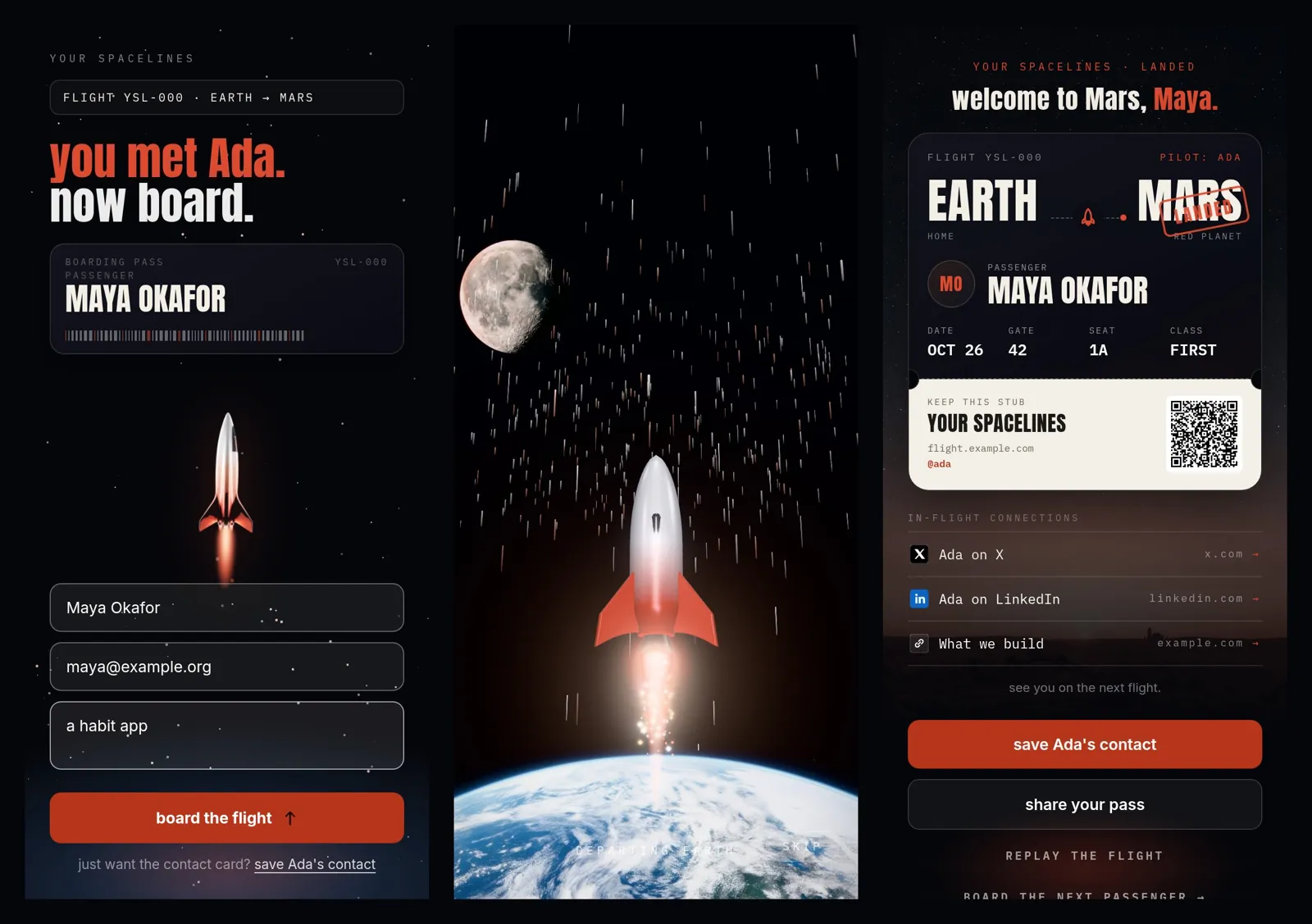
Flight Pass is a free, MIT-licensed contact swap for conferences and meetups. A guest scans your QR code, types their name and email, and rides a rocket from Earth past the Moon and down onto Mars. They land on a boarding pass with your links and a save-contact button, and you get the lead. We built it at Agniverse for our own conference trips.
Published 30 October 2026 · Updated 17 November 2026 · By An Nayal
What does Flight Pass do?
- The boarding screen. Name, email and an optional "what are you building?". The ticket stub fills in as they type.
- A 10 second WebGL flight. three.js, built while the guest types so it plays the moment they board. It falls back to a 2D canvas flight on older phones and skips straight to the pass for reduced motion.
- Three vehicles, or your own. A rocket, a galloping horse and a solid-gold gorilla. Point it at any .glb model to fly your own.
- The boarding pass. Their name, a QR code, your links, a save-contact vCard, a shareable 1080x1350 image and a replay.
- Pass links with no database. Each pass link carries the name, host, event and date in the URL (never the email), so it works even if you store nothing.
- Lead adapters. Webhook, Supabase, Customer.io and Resend, switched on with environment variables. Any mix, or none.
Who is it for?
Founders and teams going to conferences who want more than a LinkedIn QR code, and want every contact to land in their own CRM.
How do you set it up?
You need:
- Node.js 20 or newer.
- A Vercel account, or any host that runs Next.js.
git clone https://github.com/Git-Agni/flight-pass.git
cd flight-pass
npm install
npm run dev
- Clone the repo and run it locally. With no settings, each boarding is logged to your terminal.
- Put in your name, links, colours and vehicle.
- Switch on a lead adapter (Supabase, Customer.io, Resend or a webhook).
- Deploy to Vercel and print the QR code for your badge or booth.
The full instructions live in the README on GitHub, and the free setup playbook walks through it step by step.
More open source from Agniverse
Apple App Review Skill
A Claude Code skill to avoid App Store rejection: audit your app, write the Notes for Review, answer Apple's 9 questions.
One Box > Chapter Website Redesign Claude Playbook
A Claude Code skill that rebuilds your homepage and ships it as an A/B test.
Built and published by An Nayal at Agniverse. MIT licensed. All our open source.