Creator playbook · Phone call videos
How to film a realistic two-way phone call
One voice is you. The other side of the call is an AI caller we make for you, with silence built in wherever you answer. The finished video should feel like a real conversation happening live, not two audio tracks stitched together. This is the exact flow Agniverse Media creators use, start to finish.
Last updated October 2026 · Published by Agniverse Media
To film a two-way phone call UGC video: open the phone-call hook on your personal creator link, pick who's calling in the Caller voice studio, act the caller's lines yourself and let the studio convert your voice (or have it voice them for you), then play the track from a second phone in cue mode while your filming phone records you answering in the gaps. The caller's voice lands in the same take, so the edit is just trimming in CapCut. You play one side of the call; the caller's voice, the timing and the prompter are made for you inside the Agniverse platform.
- Open the hook on your creator link
- Pick who's calling
- Use my voice (or Make it for me)
- Set the pause, make the track
- Film with cue mode on a second phone
- Trim the take in CapCut, share the track
Watch the walkthrough
One real script, every button. Watch it once before your first phone-call hook, then keep this page open while you shoot.
Understand the illusion you are creating
The viewer should believe you are genuinely on the phone with someone. You are one side of the call. The studio voices the other side. Your job is to use the space inside the caller's audio to react and answer naturally on camera.
The caller speaks
You hear the caller's line.
A gap opens
The track goes silent, sized to your reply.
You answer
Say your line naturally, on camera.
The caller continues
The next caller line starts after you.
Repeat
Until the call is done.
One rule above everything else. Never record both sides separately and try to fake the timing in the edit. The pauses go into the caller track first. That is what makes your reactions and timing feel real, and it is exactly what the studio does for you.
Inside the Caller voice studio, step by step
Every phone-call hook on your brief comes with the studio built in, right under the script. No extra apps, no accounts, nothing to pay for.
- Step 01
Open the hook on your personal creator link
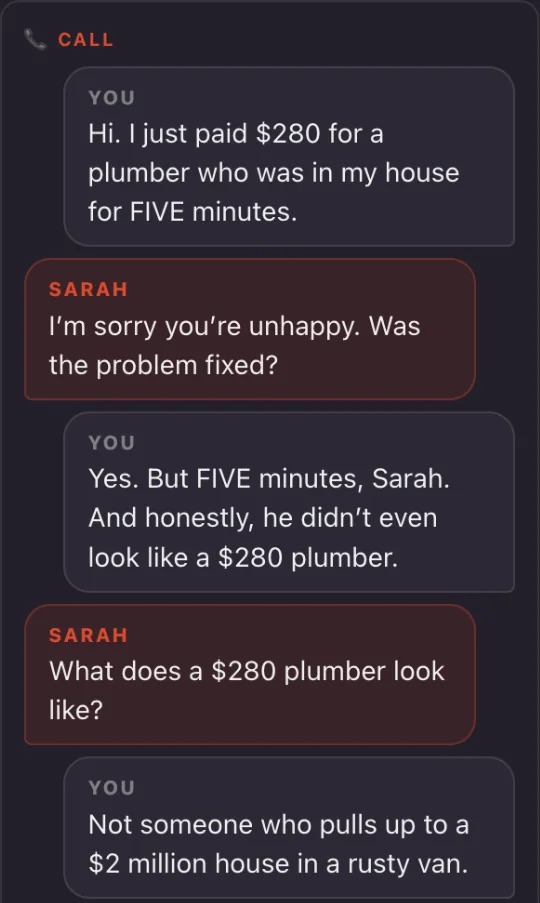
Open your brief from your personal creator link and open a phone-call hook. The script shows as a chat: the caller on the left with their name, you on the right as "You". A small "4s" next to one of your lines means the brief pins that pause. Directions in brackets, like (sighs), are performed by the caller, never read out. The Caller voice studio sits right under the script.
- 02
Read the whole call once
Before you touch a voice, read the script top to bottom. Know where the turn comes, where you get annoyed, where you laugh. You cannot react naturally to a line you are hearing for the first time on camera.
- Step 03
Pick who's calling
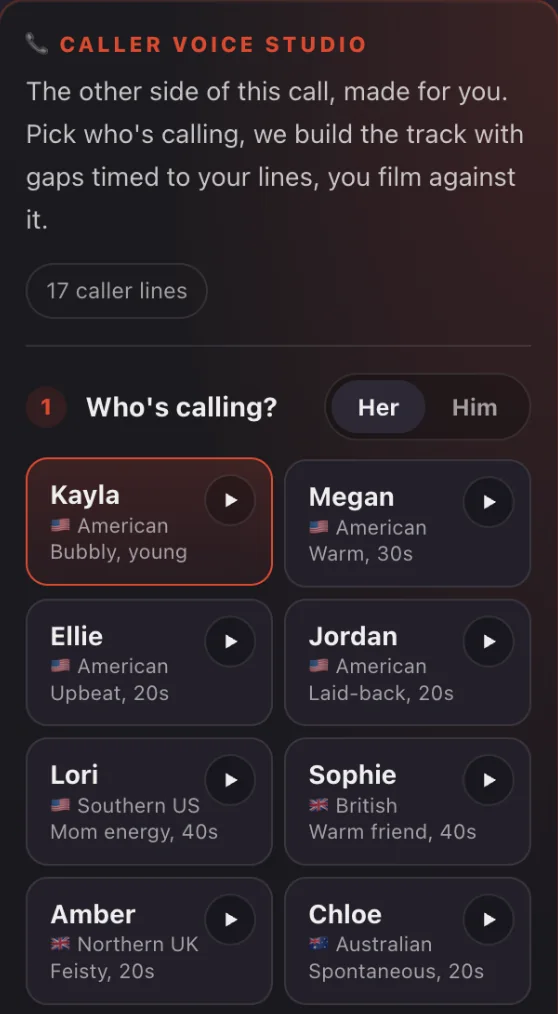
Flip between Her and Him and pick the voice your script's caller would actually be. Tap play on any card to hear a sample line first. Previews never cost anything.
- Step 04
Choose Use my voice
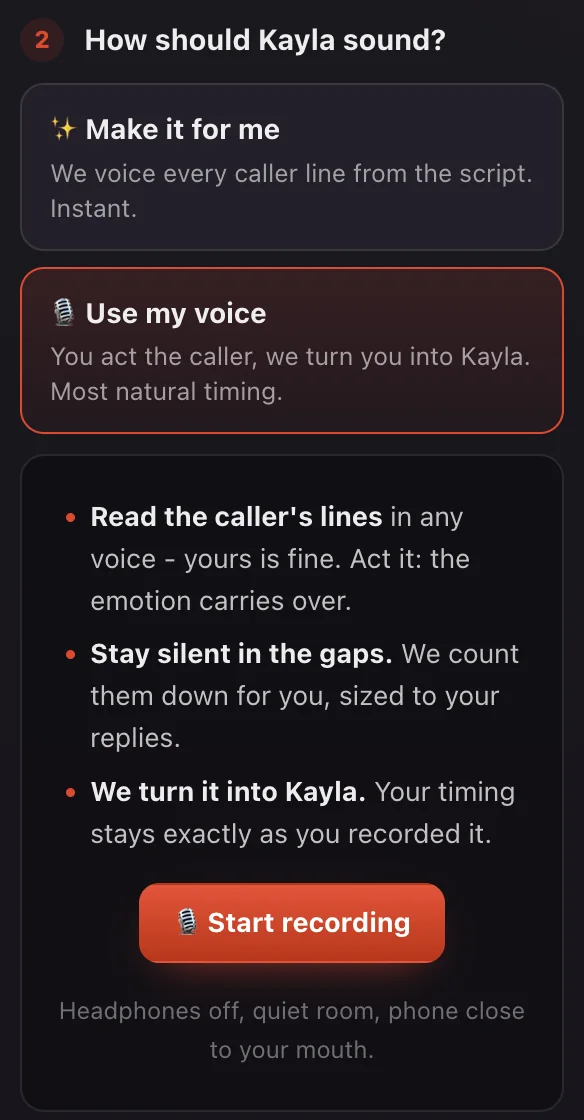
We recommend "Use my voice". Read the caller's lines in any voice (yours is fine), stay silent in the counted-down gaps, and the studio turns you into the caller's voice. Your timing, emotion and little effects stay exactly as you recorded them. "Make it for me" voices every line instantly, for when you are short on time or cannot record somewhere quiet.
- Step 05
Set the pause (Make it for me only)
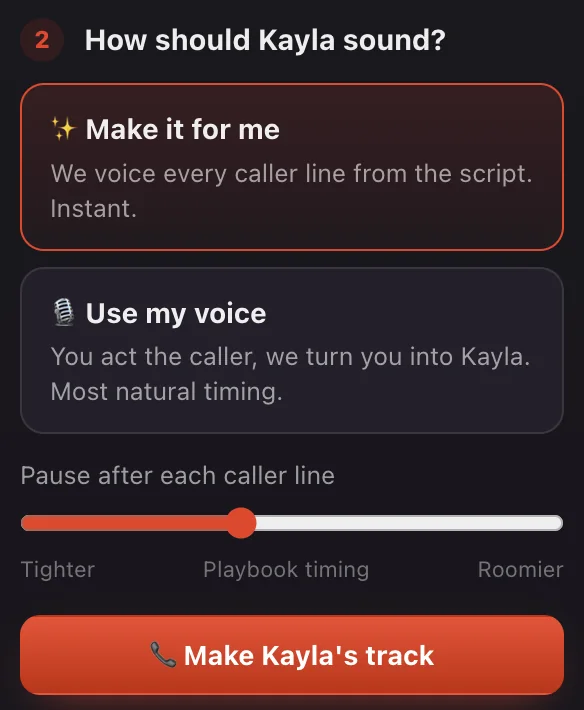
With Use my voice, the gaps are whatever you leave while recording. With Make it for me, the "Pause after each caller line" slider sets your room to answer: Playbook timing in the middle, Tighter for a punchy call, Roomier if you react before you speak. The slider is free and rebuilds the track instantly.
- Step 06
Make the caller's track
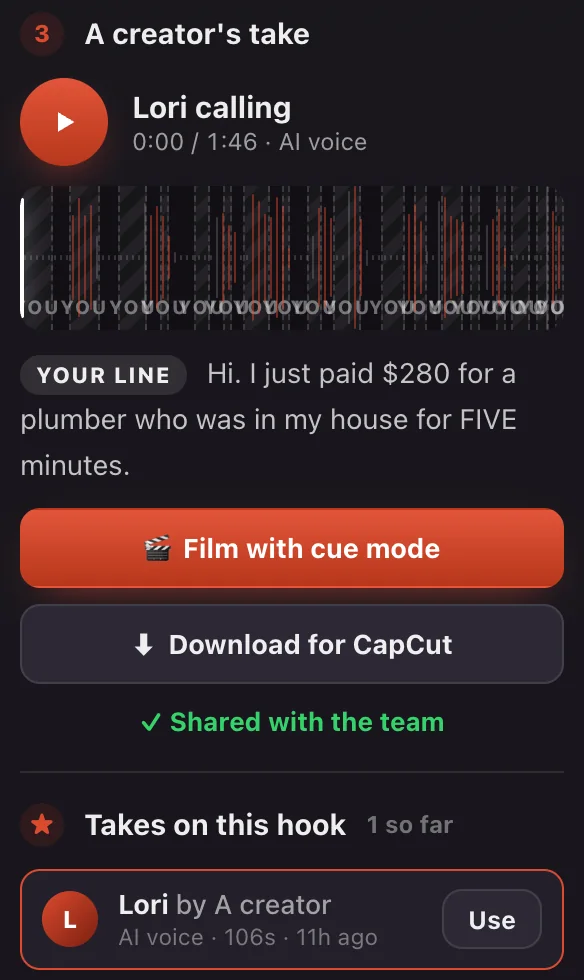
Press "Make [voice]'s track" and you get one continuous caller track: a short lead-in, each caller line in coral, and a silent gap wherever you answer. Not happy? Press "Make it again" or change the voice.
- Step 07
Film with cue mode on a second phone
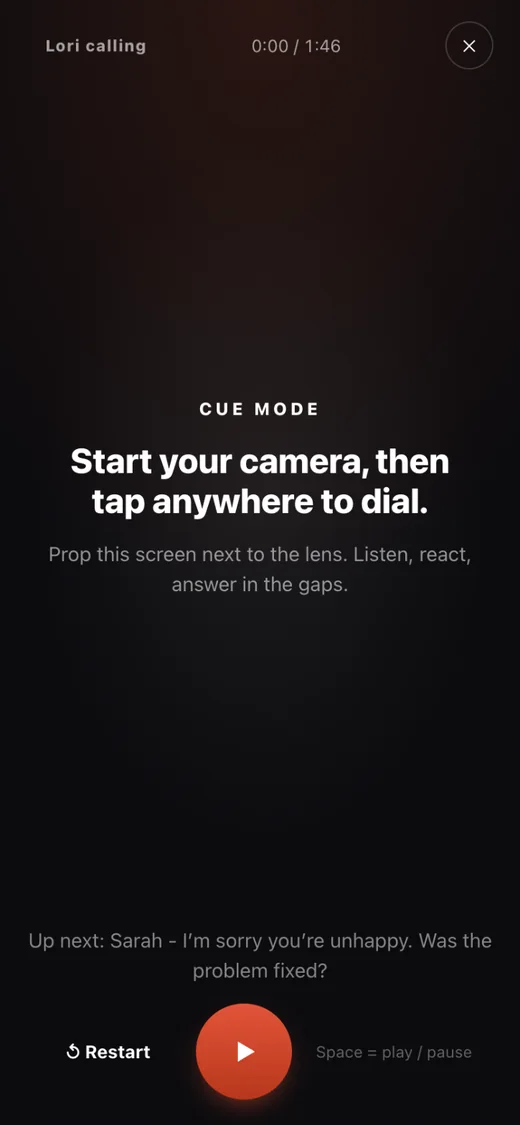
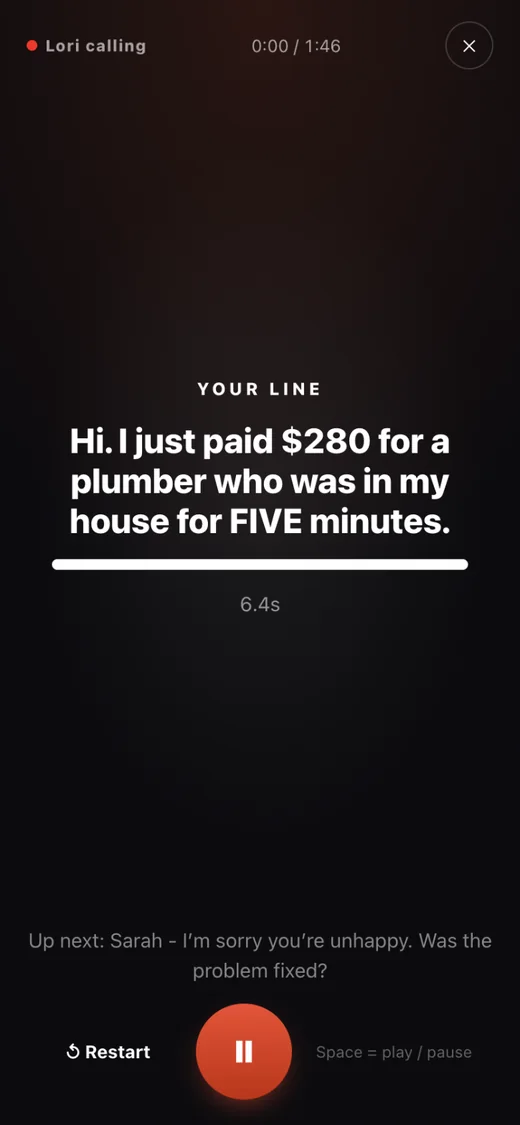
Open the studio on your second phone, press "Film with cue mode" and turn the volume up. Start recording on your filming phone, prop the prompter next to the lens, and tap to dial. It plays the caller out loud, then shows "Your line" with a countdown in every gap. Your filming phone records you and the caller in one take.
- 08
Download for CapCut (optional)
You usually will not need it, because the caller is already in your take. "Download for CapCut" saves the caller audio as one file, for when the speaker came out too quiet or you want a cleaner caller track in the edit.
- 09
Share a good take with the team
If the caller track came out great, press "Share with the team". It shows up under "Takes on this hook", where any creator on the same hook can press Use and film against it straight away.
Use my voice or Make it for me?
Use my voice whenever you can. You decide how the caller sounds, where they sigh, laugh or cut in, and the studio only changes whose voice it is.
Use my voice
RecommendedYou perform the caller in any voice (yours is fine), the studio counts down each silent gap for you, then converts your recording into the caller's voice. Your pacing, sighs, attitude and any effects you add carry over. Headphones off, quiet room, phone close to your mouth.
Make it for me
InstantThe studio voices every caller line from the script and lays the gaps for you. Tune the room you get with the pause slider. Fast and consistent, and lines other creators already made on this hook are reused for free. Less control over delivery.
The caller voices
Sixteen callers, chosen to sound like real friends, moms, partners and coworkers across the US, the UK and Australia. Pick the one your script's caller would actually be.
| Voice | Accent | Vibe |
|---|---|---|
| Kayla | American | Bubbly, young |
| Megan | American | Warm, 30s |
| Ellie | American | Upbeat, 20s |
| Jordan | American | Laid-back, 20s |
| Lori | Southern US | Mom energy, 40s |
| Sophie | British | Warm friend, 40s |
| Amber | Northern UK | Feisty, 20s |
| Chloe | Australian | Spontaneous, 20s |
| Voice | Accent | Vibe |
|---|---|---|
| Jake | American | Relaxed, 30s |
| Tyler | American | Eager, 20s |
| Ryan | American | Upbeat, 20s |
| Travis | Southern US | Steady, 40s |
| Ollie | British | Spontaneous, 20s |
| Harry | British | Easygoing, 20s |
| Liam | Australian | Laid-back, 20s |
| Bruce | Australian | Dad energy, 50s |
Film it like a real phone call
This is where most phone-call videos start to look fake. Do not just wait for your line. Listen, react, interrupt slightly when it fits, and let your face change before you speak.
- Set up two phones: one records you, the other plays the caller in cue mode with the volume up.
- Start recording first. Give yourself a second before you tap to dial.
- Hold the phone, or frame yourself, exactly as you would on a real call. Avoid looking into the lens unless the brief asks for it.
- Listen to the caller and react while they are still talking.
- Use the gap to answer naturally. Cue mode shows your line and how long you have.
- Let the caller continue, and keep going until "That's the call. Cut."
- Do another take if it felt rehearsed. Natural delivery beats a clean first take.
Do this
- React before your line starts.
- Use small facial expressions while you listen.
- Let your answer overlap very slightly when it feels natural.
- Vary your rhythm. Real people do not speak at identical intervals.
- Keep your body moving naturally while the caller talks.
Avoid this
- Staring blankly while you wait for your cue.
- Starting every answer exactly after the same pause.
- Overacting or shouting unless the script calls for it.
- Looking like you are reading lines off-screen.
- Long dead-air gaps that would never happen on a real call.
Trim the fat in CapCut
Your take already has both voices in it, so there is nothing to sync. The edit is just cutting it down to a clean, fast conversation.
Import your take
Start a new CapCut project and add the clip. The caller is already in the audio.
Trim aggressively
Cut the ringing, taps, setup moments, overly long silences and the end of the call.
Check the levels
You and the caller should both be easy to hear. Nudge the volume if the speaker came out quiet.
Watch once without editing
If you notice the timing, the edit is not finished.
A real conversation is slightly messy. Do not polish it until it sounds like two voiceovers taking turns. Keep tiny overlaps, breaths and reaction moments when they make the call believable.
The gold standard: watch Kelly first
Kelly is one of our creators, and this Reel is the reference for how a finished phone-call video should feel. Do not copy her personality line for line. Copy the mechanics: listen, react, answer naturally, and make the caller feel like a real person on the other end.
- 478Kviews
- 18.3Klikes
- 2,172comments
Listen before you answer
Your face and body are already reacting while the caller talks.
Keep conversational timing
It never feels like caller line, wait, creator line. Jump in where a real person would.
Talk to the caller, not the camera
Your attention belongs to the call unless the brief says otherwise.
React before you speak
Disbelief, annoyance or amusement starts before the words do. That sells it.
Copy from Kelly
- The listen, react, answer rhythm.
- Small reactions while the caller is still speaking.
- Fast conversational pacing.
- Answers that feel spontaneous, not recited.
- A believable physical "I'm on a call" performance.
Do not copy
- Her exact expressions or personality.
- Her script, unless it is assigned to you.
- Every pause at exactly the same length.
- An exaggerated imitation of her delivery.
Your benchmark: someone watching without knowing the caller is AI should assume you were genuinely reacting to a person on the phone.
Before you send it
Run through this before you submit. Your ticks stay saved on this device.
0 of 8 ready
Frequently asked questions
How do you film a fake phone call video for TikTok or Reels?
Do I need an ElevenLabs account or any other voice tool?
How long should the pause be after each caller line?
What is the difference between Make it for me and Use my voice?
What is cue mode?
Who can use the Caller voice studio?
Is there a limit on how many tracks I can make?
Why does my phone call video look fake?
More for creators
Not an Agniverse creator yet?
Our creators get the studio, the scripts, feedback on every clip and monthly pay plus bonuses. Fully remote.
Published by Agniverse Media for the creators we work with. The Caller voice studio is built in-house and lives on every phone-call hook in your brief. Current as of October 2026. Something in the studio does not match this page? Tell your creator manager and we will fix it.